All your WhatsApp support in one panel, in real time
Neura AI puts your whole team on the same number, turns every conversation into a card on your pipeline and shows who is waiting for a reply, and for how long. Open source to run on your own server, with a managed cloud version on the way.

Your pipeline stages
Multiple pipelines, with the stages you define.
Deal value
A value on every card, and a total per stage, no spreadsheet.
AI forecast
The chance of closing each card, when AI is turned on.
Response time
On time, warning or late, visible on every card.
Everything live
Cards and totals update without reloading the page.
Built for teams that sell and support on WhatsApp
One phone for a whole team
Several agents reply from the same number, each on their own computer, without passing the phone around or losing track of who said what.
Customers left on read
Every conversation shows how long the customer has been waiting. SLA tracking flags what is running late before it turns into a complaint.
Sales lost in the chat
Every conversation becomes a card on your pipeline, with a value. You see what is being negotiated without opening conversations one by one.
Voice notes nobody has time for
With AI turned on, voice notes arrive transcribed and the conversation gets a summary and a suggested reply. Without AI, everything else works the same.
What it looks like day to day
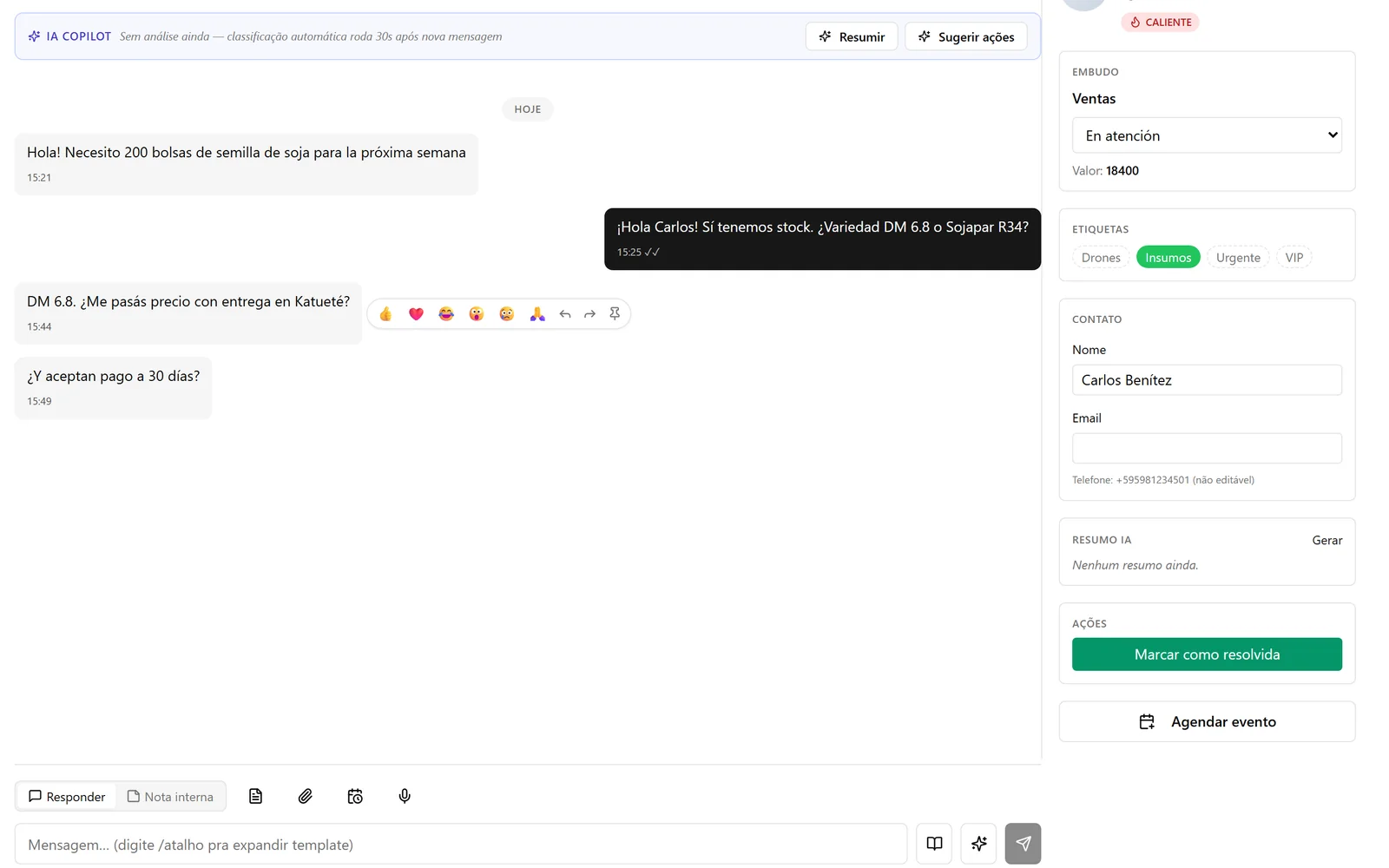
Conversations with context
History, pipeline stage, labels and contact details sit on the same screen as the conversation. Agents reply without switching tabs.
- Reply to the customer or leave an internal note only the team sees
- Templates by shortcut, attachments, voice and scheduled messages
- AI conversation summary and suggested next steps
- Labels and "mark as resolved" in one click
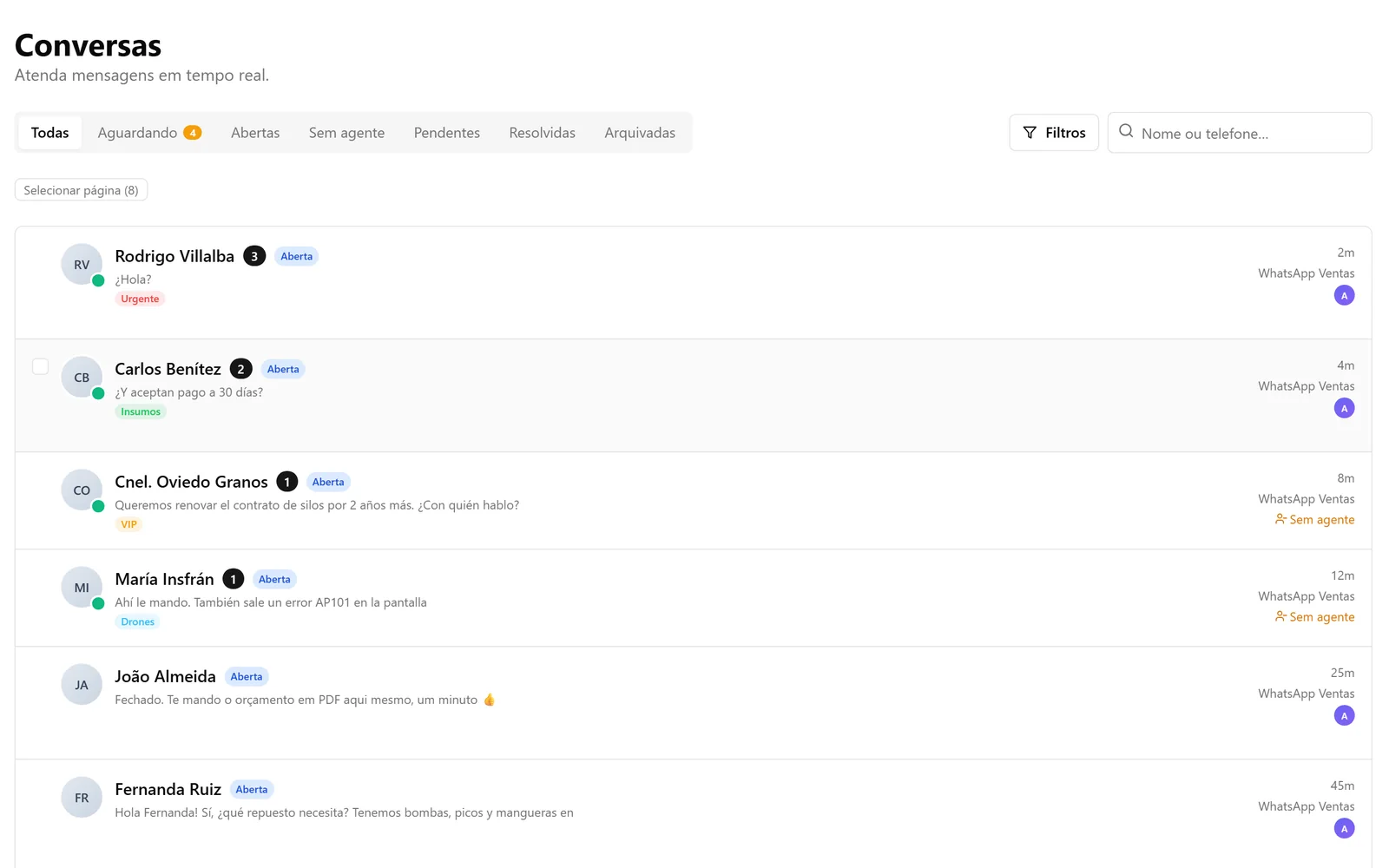
An organized inbox
Conversations from every channel in a single list, split by what needs action now.
- Tabs: waiting, open, unassigned, pending, resolved
- Search by name or phone, and saved filters
- Labels and an assigned agent on every conversation
- Bulk actions across many conversations at once
From a connected number to your first conversation
- 01
Connect your channels
WhatsApp connects by scanning a QR code, like WhatsApp Web. Telegram, email and your website chat connect in the same panel.
- 02
Bring in your team
Invite agents by email and set who is an admin, a supervisor or an agent.
- 03
Set up the pipeline and reply
Create your stages, templates and response-time rules. From then on, every new conversation lands as a card and the panel shows who is waiting.
Everything that comes with it
Channels
- WhatsApp via QR code pairing, multiple numbers
- Telegram
- Email, inbound and outbound
- Chat widget for your website
Team
- Isolated workspaces per company
- Roles: admin, supervisor and agent
- An assigned agent on every conversation
- Audit log of sensitive actions
AI (optional)
- Voice note transcription
- Reply suggestions
- Conversation summary and next steps
- Knowledge base the AI draws on
Automations
- Welcome flow
- Scheduled messages
- Reply templates
- Satisfaction surveys (CSAT and NPS)
Management
- Reports and a KPI dashboard
- Contacts with custom fields
- Contact import from CSV
- Events calendar
Integration and security
- REST API with access keys
- Signed webhooks (HMAC)
- Encrypted channel credentials (AES-256)
- Rate limiting against abuse
On your server or with us
The open-source edition is available now for teams that have a server and want full control. The cloud edition is for teams that just want to use it.
| Comparison | Available nowOpen source (self-host) | Coming soonManaged cloud |
|---|---|---|
| Who hosts it | You, on your own server, with Docker Compose. | Neura AI. You don't need a server. |
| WhatsApp connection | Unofficial, via QR code. WhatsApp may ban the number. | Official WhatsApp Business API (Meta). |
| Setup and updates | On you, following the guide in the repository. | On us. |
| Data backups | On you. | On us. |
| Technical skills | Someone who can run a Linux server with Docker. | None beyond using the panel. |
| Code | Open, AGPL-3.0 license, no license fee. | Service managed by Neura AI. |
| Join the waitlist→ |
Want the cloud version? Join the waitlist
Leave your email and we'll let you know when the cloud version opens. Just that one message, no spam.
Frequently asked questions
What is Neura AI?
A customer support platform for WhatsApp (plus Telegram, email and website chat) where your whole team replies from the same number, in a panel with a kanban, response-time tracking and optional AI. It is built by Neura AI and the code is open.
How much does it cost?
The open-source edition has no license fee: you only pay for your server. Pricing for the cloud edition has not been announced yet; people on the waitlist get the launch announcement.
Can my WhatsApp number get banned?
On the open-source edition, yes. It connects via QR code, unofficially, and WhatsApp may ban the number, especially for bulk messaging. Use it for customers who message you first, ideally on a dedicated number. The cloud edition will use the official WhatsApp Business API.
Do I need to know how to code?
For the open-source edition, you need someone who can set up and maintain a server with Docker; the setup guide is in the repository. For the cloud edition, no: we take care of the infrastructure.
Is the AI required?
No. Voice transcription, suggestions and summaries only turn on once an OpenAI key is configured. Without it, the kanban, conversations, SLA and automations work as usual.
Where is conversation data stored?
On the open-source edition, on your server: the database and files stay with you.
Can you tailor Neura AI to my company?
Yes. Integration with your systems, specific automations and changes to your support flow are handled as a custom project. Get in touch through the form on this site.
Need something custom?
Integration with your ERP, specific automations or a different support flow: we build it on top of Neura AI or from scratch.